

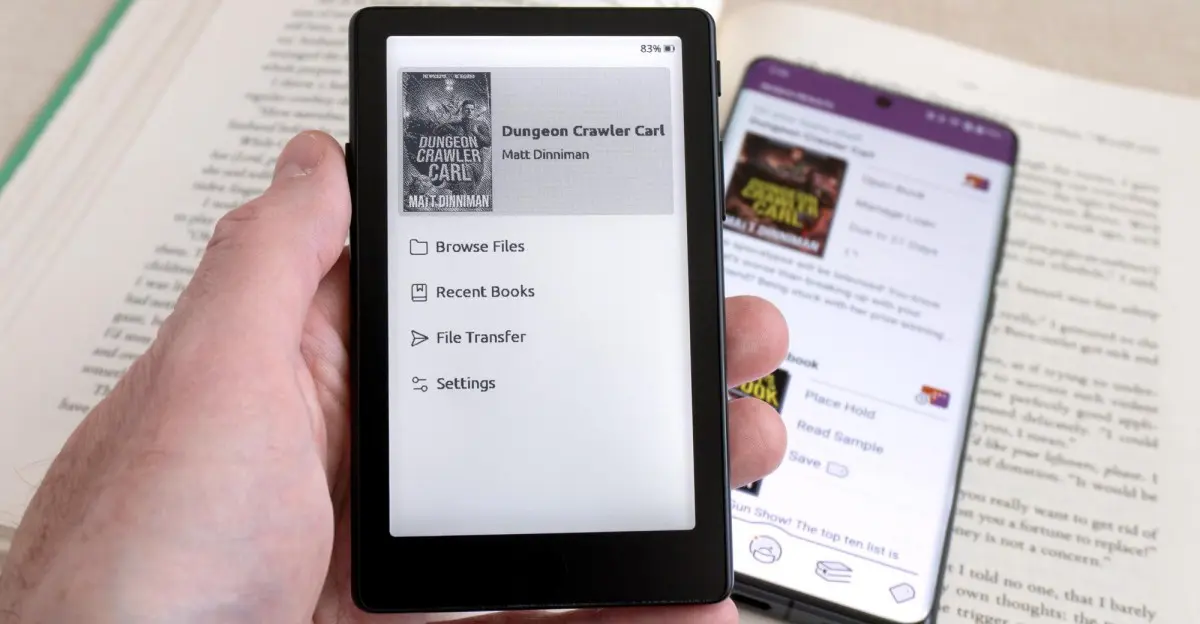
One of the biggest tradeoffs with Xteink’s pocket-friendly e-readers has always been their limited access to ebooks. While Kindle and Kobo devices let users download tens of thousands of titles directly through their respective online stores, Xteink’s small-format readers traditionally required users to source DRM-free ebooks on their own. That limitation is about to change, as the developers of CrossPoint Reader — a free alternative firmware for the X3, X4, and X4 Pro — are introducing support for third-party plug-ins that will expand the devices’ capabilities.
The first community-built plug-in will give Xteink devices access to DRM-protected ebooks borrowed through OverDrive’s Libby library app or purchased from bookstores like Kobo. This is a major development for a niche but enthusiastic community of e-reader users who have long appreciated Xteink’s ultra-portable designs but chafed at the ecosystem’s closed nature.
What’s changing for Xteink owners
Until now, anyone using an Xteink X3, X4, or X4 Pro had to manually source DRM-free EPUB or PDF files and then sideload them onto the device. This process was manageable for tech-savvy users but a significant barrier for mainstream readers who are accustomed to the convenience of built-in bookstore access or seamless library borrowing.
The new functionality is still in beta, but the team behind CrossPoint Reader is making it available to anyone who wants to try it. The developers provided custom firmware to a few testers who spent several days with the X4 Pro to evaluate the experience. While getting ebooks from Libby onto the tiny e-readers is not as streamlined as using Libby’s mobile app or as simple as Kobo’s native OverDrive support, it is reportedly much easier than expected. For users who are already comfortable with wirelessly transferring files to their Xteink devices, loading borrowed library books is not much harder than any other sideloading task.
How the new plugin works
The first step is replacing the stock firmware with CrossPoint Reader. This free alternative firmware has long been popular among Xteink enthusiasts because it improves stability, adds customization options, and opens up the hardware in ways the factory software does not. The easiest installation method is to connect the e-reader to a computer via USB-C, power it on, and then flash the new firmware directly through a browser using the CrossPoint Reader website. The web-based flasher lets users select their specific device model and the desired firmware version.
After the firmware is installed, users need to download and install CrossPoint Reader’s new Plugin Store. The installation is as simple as unzipping a few files onto the e-reader’s microSD card, which then adds a new Plugins section to the homescreen. Currently, the Plugin Store includes a few helpful tools, but the important one for this new capability is the “Protected Content” plug-in. This plug-in runs through CrossPoint Reader’s built-in web server and allows Xteink devices to access ebooks protected by Adobe Digital Editions DRM.
Getting set up with Libby and Kobo
To use DRM-protected ebooks, users need a free ByteBooks account. Alternatively, an older Adobe Digital Editions account that has not been touched in years can be converted. The account is required to authorize the e-reader to open DRM-protected files. Users will also need access to Libby itself on another device, which requires a library card to sign in.
One important limitation is that Xteink devices use low-power ESP-32 processors. Because of this, users cannot search or download ebooks from Libby directly on the e-readers themselves. Instead, the borrowing process happens on a smartphone, tablet, or computer. Once a book is borrowed, the Libby app allows the user to download it as a protected EPUB file. What is actually downloaded first is a tiny ACSM file that an authorized reading app can use to access the DRM-protected ebook file. The new “Protected Content” plug-in, running through the CrossPoint Reader web server, processes the ACSM file after it is moved to the microSD card. The plug-in downloads a copy of the book and copies the EPUB file to the e-reader, where it can be read for as long as the loan allows.
A similar process works for ebooks purchased from stores like Kobo that use the EPUB format with Adobe Digital Editions. Amazon’s Kindle format is not supported, as Amazon uses a proprietary DRM scheme. When logged into Kobo’s website, users can download an ACSM file for a purchased book, copy it to the Xteink device, and then process it with the plug-in to access the readable ebook.
Common Stacks simplifies the workflow
For those who want to simplify the Libby process further, a new app called Common Stacks is available for Android, Windows, and macOS, with iOS support coming soon. The app is designed to provide access to multiple free ebook libraries, including self-hosted ones. It includes full access to Libby and can both download and send ebook files directly to Xteink e-readers with just a couple of clicks.
Common Stacks relies on CrossPoint Reader’s web server functionality running in the background, but the user experience is much closer to borrowing library books on a Kobo. Testers reported that getting borrowed books onto the X4 Pro was as easy as borrowing library books on a dedicated Kobo device. The app automatically handles the ACSM file processing and transfers the resulting EPUB to the connected e-reader, eliminating the need for manual file management.
What to keep in mind
While Libby and Common Stacks offer one of the best ways to get free ebooks onto Xteink devices, users should remember that library selection varies from library to library. Popular titles may have wait times depending on how many digital copies are available or already loaned out. This is no different from using Libby on any other device, but it is still a factor for users who expect instant access to every book they want to read.
The introduction of DRM support is a significant step forward for Xteink’s tiny e-readers. These devices have always appealed to travelers, minimalists, and anyone who wants a pocket-sized reading device that is lighter and more portable than a typical tablet or smartphone. The original firmware, however, was often criticized for its limited app support and awkward navigation. CrossPoint Reader has steadily improved that experience, and the new plug-in architecture promises to extend the devices’ usefulness far beyond what the original software allowed.
The plug-in system is open to third-party developers, which means the community can continue to add new features and integrations. The Protected Content plug-in is only the first example of what is possible. Developers could create tools for accessing other ebook sources, syncing reading progress with cloud services, or even integrating note-taking and highlighting tools. The low-power ESP-32 processor imposes some constraints, but the success of the Protected Content plug-in shows that a well-designed extension can work around those limitations.
For now, Xteink owners who want to borrow free library books or read DRM-protected ebooks from retailers like Kobo have a practical path forward. The setup process requires a bit of technical comfort, but the payoff is significant and the tools are becoming more polished. As the beta progresses and Common Stacks continues to evolve, the experience is likely to become even smoother. With access to DRM-protected ebooks — whether borrowed or bought — Xteink’s tiny e-readers are becoming an even more tempting alternative to the dominant devices from Amazon and Rakuten.
Source: The Verge News