

Handheld gaming systems aren't niche anymore. Today's devices range from compact devices built around retro emulation to full-fledged portable PCs capable of running modern AAA games. That variety is exciting, but it also makes shopping harder. The "best" gaming handheld now depends less on a single, standout device and more on how, where and what you want to play.
Some handhelds are designed for quick sessions and classic libraries, prioritizing simplicity, long battery life and pocketable designs. Others blur the line between console and PC, offering large screens, powerful chips and access to massive game libraries, often at the cost of size, price or endurance. There are even more experimental options that focus on unusual controls or intentionally limited experiences.
We've spent months testing and tracking the fast-moving handheld space to figure out which devices are actually worth your money right now. Whether you're looking for a versatile all-rounder, a premium portable gaming PC or a dedicated machine for retro games, these are the gaming handhelds that stand out in an increasingly crowded field.
Best handheld gaming devices for 2026
Best handheld gaming PC for most
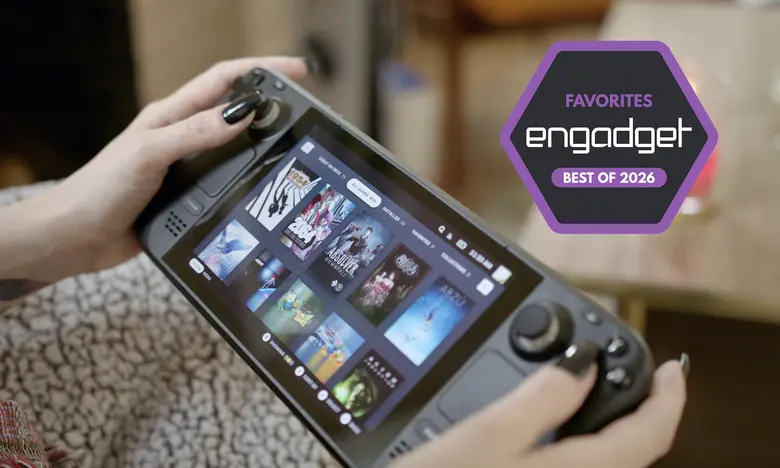
Steam Deck
Steam Deck OLED – Display: 7.4-inch HDR OLED, 1,280 x 800 resolution, 1,000 nits peak HDR brightness, 600 nits SDR brightness, up to 90Hz | Processor: Custom 6nm AMD APU | RAM: 16GB LPDDR5 6400 MT/s | Storage: 512GB, 1TB SSD | Battery: 50Whr | Dimensions: 11.73 x 4.6 x 1.93 inches | Weight: 1.41 pounds | Wireless: Wi-Fi 6E, Bluetooth 5.3 | OS: SteamOS
Steam Deck LCD – Display: 7-inch IPS, 1,280 x 800 resolution, 400 nits brightness, 60Hz | Processor: Custom 7nm AMD APU | RAM: 16GB LPDDR5 5500 MT/s | Storage: 256GB SSD | Battery: 40Whr | Dimensions: 11.73 x 4.6 x 1.93 inches | Weight: 1.48 pounds | Wireless: Wi-Fi 5, Bluetooth 5.0 | OS: SteamOS
Three years into its life, Valve's Steam Deck remains the best balance of price, performance and usability in the gaming handheld market. More specifically, the Steam Deck OLED is a thorough upgrade over the original. Starting at $549 for 512GB of storage, this model features a 7.4-inch OLED display that's brighter, faster, slightly bigger and more vivid than the 7-inch IPS panel on the entry-level model. The higher contrast and richer colors of an OLED screen makes every game look better by default, but this display also supports HDR, with significantly brighter highlights. The maximum refresh rate jumps from 60Hz to 90Hz as well, which helps many games look smoother in motion.
Due to the less power-hungry display, a more efficient AMD APU and a larger battery, the Steam Deck OLED also lasts longer than the original. No handheld can play resource-intensive "AAA" games for very long, but Valve says the OLED model can run for three to 12 hours depending on the game, whereas the LCD model lasts between two and eight. A larger fan keeps things cooler and quieter, and the chassis feels lighter. Performance is roughly the same, though the OLED model's increased memory bandwidth can help it gain a couple extra frames in certain games.
Still, $549 isn't a small investment. The entry-level Steam Deck may come with a more basic LCD display and a smaller 256GB SSD, but it delivers the same core experience for $150 less. At $399, it continues to be a strong bargain. Consider that model our pick for the best "budget" handheld gaming PC you can buy.
To be clear, either Steam Deck model definitely shows its age in 2026. Many of the most graphically demanding games released in the past couple of years just don't run well on this hardware, if they're supported at all. Issues with Linux and anti-cheat software have rendered live-service games like Destiny 2 and Apex Legends unplayable, too.
That said, the Deck can still play tons of games that just aren't possible on the original Nintendo Switch or other handhelds at this price, from Elden Ring to Final Fantasy VII Rebirth to Kingdom Come: Deliverance II. It's also a natural home for the mountain of older and/or smaller-scale gems littered throughout Steam. (Hello, Balatro.) While official game support is limited to a subset of the Steam library, the list of formally verified and still-playable titles is massive, diverse and constantly growing. You can easily stream games, too, and there are workarounds to access other storefronts.
As for software, a steady stream of updates has turned Valve's SteamOS into a flexible yet user-friendly platform. You'll still need to make tweaks every now and then to get a game running optimally, but the process is typically straightforward, and there's a wealth of community-driven resources that document exactly what settings you may need to change.
The Deck's processing power, combined with third-party tools like EmuDeck, makes it a superb handheld for emulation as well. Some PS3 and original Xbox games can be tricky, but just about everything else works beautifully. You can also cloud stream Xbox games with a little setup.
The Steam Deck's biggest issue is its size: At two inches thick and nearly a foot long, it stretches the definition of a "handheld" device, even if the OLED model is lighter by comparison. The LCD Deck can get warm and noisy fairly quickly, too, and the d-pad on both devices is somewhat mushy. But the contoured grips on the back help offset the bulk, and both versions feel sturdy, with responsive face buttons and triggers, smooth joysticks and useful dual touchpads.
- Pros: Enough power to play many modern PC games; User-friendly interface; Vivid display on OLED model; LCD model is fantastic value; Superb emulation performance.
- Cons: Bulky; Not the most powerful hardware; Doesn't officially support every Steam game or games from other PC clients.
Best premium handheld gaming PC
Lenovo Legion Go S (SteamOS, Z1 Extreme)
Display: 8-inch IPS, 1,290 x 1,200p resolution, 500 nits brightness, 120Hz, VRR | Processor: AMD Ryzen Z1 Extreme | RAM: 32GB LPDDR5 7500 MT/s | Storage: 1TB SSD | Battery: 55.5Whr | Dimensions: 11.77 x 5.02 x 0.89 inches | Weight: 1.61 pounds | Wireless: Wi-Fi 6E, Bluetooth 5.3 | OS: SteamOS
The Lenovo Legion Go S is the closest thing we have to a Steam Deck 2. It's the first third-party device to natively run SteamOS, and as such it has all the same conveniences (and occasional game compatibility issues) as Valve's handheld. The difference is that it's a more modern piece of hardware, with a beefier AMD Ryzen Z1 Extreme processor, 32GB of RAM and a 1TB SSD in the configuration we tested. It can also reach a maximum power draw of 33W in handheld mode or 40W when plugged in, well above the Deck's 15W. All of that makes it better for more resource-intensive games. It can be a noticeable improvement at equal settings, and you get far more room to crank things up and reach that magic 60 frames per second (fps) target in many recent AAA games.
The Legion Go S has a larger 8-inch display than the Deck, with a sharper 1,920 x 1,200 resolution and faster 120Hz refresh rate. It also supports variable refresh rates (VRR), which helps minimize distracting screen tearing. That is a crucial advantage, and the extra real estate is great for taking games in. This is an LCD display, however, not the OLED panel available with the Deck. Colors aren't quite as vivid and peak brightness is lower at 500 nits. There's no HDR either. Still, it's above-average. Which is "better" really comes down to how much you value VRR and pixel count against OLED-level contrast.
The Legion Go S is a little chunkier and heavier than the Steam Deck, which already isn't exactly svelte, so it'll be even more fatiguing to hold for hours at a time. But if you can handle the weight, you may find this design more ergonomic. The rounded edges and textured grips are natural to hold, while many longtime console players will feel more at home with the offset joysticks and d-pad. Hall effect sensors (which reduce the risk of joystick drift) and dual USB-C ports are nice perks as well.
There are only two back buttons and one dinky touchpad, however, if you find yourself using those often. The extra horsepower means the fans are much louder. And while it has a bigger 55.5Whr battery, the Deck often lasts a bit longer, especially with less demanding games. If you want to max things out with the heavier stuff, expect the Legion Go S to survive for less than two hours.
The biggest trade-off is the price: The Z1 Extreme version of the Legion Go S now costs a hefty $900. But if you're looking to play recent blockbusters on the go more than indie games or the older gems in your backlog, it should be worth grabbing.
There is another configuration of the Legion Go S with a lower-tier Ryzen Z2 Go chip, 16GB of RAM and 512GB of storage available for $650, which is $100 more than the Steam Deck OLED. We haven't been able to test that one yet, but it should still be more performant than Valve's device, albeit to a lesser extent. If you want a SteamOS device with a bigger screen, higher resolution and VRR, it's worth considering. That said, keep in mind that Valve is opening up SteamOS to more third-party devices as time goes on.
- Pros: Better performance than Steam Deck and most Windows handhelds; Runs official SteamOS; Spacious display with VRR; Good ergonomics.
- Cons: Pricey; Heavier than Steam Deck; No HDR support; Weak haptics.
Best Windows gaming handheld
ASUS ROG Xbox Ally X
Display: 7-inch IPS, 1080p resolution, 500 nits brightness, 120Hz, VRR | Processor: AMD Ryzen Z2 Extreme | RAM: 24GB LPDDR5X 8000 MT/s | Storage: 1TB SSD | Battery: 80Whr | Dimensions: 11.45 x 4.78 x 2 inches | Weight: 1.58 pounds | Wireless: Wi-Fi 6E, Bluetooth 5.4 | OS: Windows 11
If you're willing to spend extra for more software flexibility, you can skip the SteamOS devices and buy a Windows-based handheld instead. The ASUS ROG Xbox Ally X is our current favorite of those, and it's a decent if expensive alternative to the Steam Deck if you're willing to trade some ease of use for a higher performance ceiling.
While Microsoft is marketing it as a handheld Xbox, the Xbox Ally X is really just another iteration of ASUS' ROG Ally line of portable gaming PCs. It can't play every game you might own on an Xbox console, nor does it use the exact same simple UI. So don't go in expecting this to be the Xbox version of a Nintendo Switch. Instead, it runs Windows 11, just like the original ROG Ally and ROG Ally X before it. However, this model ships with a new "Xbox full screen experience" that essentially uses a modified version of the Xbox PC app as its default interface. This aggregates and organizes your PC games from across storefronts (Steam included), reduces background tasks to marginally aid performance and generally makes it easier to navigate the device with gamepad controls.
Taking a wider view, there are three main reasons to consider the ROG Xbox Ally X over the Steam Deck. As with the Legion Go S, the first is power: The last couple of ROG Ally devices were already more consistent about playing graphically intense games at higher frame rates, thanks in large part to a "Turbo mode" that boosts the device's power draw to 25W, or 30W when plugged in. Here, the latter bumps up to 35W. Either way, the Ryzen Z2 Extreme chip and 24GB of RAM in the Xbox Ally X only furthers this advantage, especially at lower power draws. If you mainly want to play demanding AAA games, this device is far more likely than the Deck to run them well, both today and into the future. It's still a handheld, so you'll have to tinker to get some games running optimally, but you won't have to resort to "potato" settings nearly as often as you do with Valve's machines.
The second major selling point is VRR. The 7-inch LCD display here is virtually identical to the one used on older ROG Allys: It's neither as bright nor color-rich as the Steam Deck OLED's screen, nor is it as spacious as the Legion Go S' panel. But it's both sharper (1080p) and faster (120Hz) than the Deck's display, and its VRR support does wonders to keep games looking smooth even when their frame rate fluctuates.
The third key advantage, and the Xbox Ally X's biggest pro compared to the Legion Go S, is the fact that Windows lets you play games from any PC client instead of funneling you toward a selection of Steam games. If you've built up libraries on stores like Epic, GOG or the Xbox app, you can access them here like you would on any other Windows PC — no workarounds required. For Xbox Game Pass games, Epic Games Store exclusives or finicky always-online titles like Destiny 2 that require anti-cheat software, this is great.
The new Xbox full screen experience does go some way toward minimizing the clunkiness that has long plagued Windows gaming handhelds. Putting the device into sleep mode (mostly) works now. The new app switcher is intuitive. And you do have the freedom to install a distro like Bazzite if you want a near-identical (if unofficial) experience to SteamOS. Of course, you could also just spend most of your time using Steam's Big Picture Mode.
That said, you'll probably still run into some familiar Windows quirks and annoyances here. Navigating the OS with touch controls is still frustrating whenever you inevitably end up having to go outside of the Xbox UI. Needing to use the desktop version of the Windows update tool to update the Xbox app, for example, is just awkward. Sometimes you may need to jump into ASUS' Armoury Crate app to access certain settings instead of the main Xbox UI. Sometimes you won't see a pop-up, error message or launched app without manually checking what's going on in the background yourself. And no gaming handheld ever needs programs like Microsoft Teams or OneDrive to come pre-installed.
To reiterate: This isn't an Xbox, it's a Windows PC. And while it's certainly better than other Windows handhelds at feeling less... Windows-y, the Steam Deck and SteamOS remain easier to just pick up and use, even if they feel more closed off as a result. But if the flexibility of Windows appeals to you, the changes here do make things a bit more legible. Just note that other handhelds are set to receive this new Xbox UI as well starting next year.
It also helps that the Xbox Ally X is a nice piece of kit. It's still chunky and heavy, but its pronged grips make it easier to hold for longer stretches than previous Ally devices. The giant 80Whr battery helps it last longer than most Windows handhelds we've tested — we got roughly three and a half hours out of Clair Obscur: Expedition 33, for example, playing in 1080p at medium settings with the screen brightness maxed out. The face buttons, joysticks and triggers are all tight and comfortable; together they make it feel like you're using a traditional Xbox controller. The speakers are nice and loud, too.
The Xbox Ally X costs $1,000, so there's no getting around the fact that it's a luxury purchase. You could get a Steam Deck OLED and a Nintendo Switch 2 for the same price. But if you have an Xbox Game Pass subscription, or if you're willing to brave the occasional UX sloppiness in order to play games from any client anywhere you want, it could be worthwhile. If nothing else, it should hold up better than most portable PCs going forward.
Be aware that ASUS makes a lower-cost version of this device called the ROG Xbox Ally (no X). We haven't been able to test that one, but it comes with a weaker Ryzen Z2 A chip, a smaller battery and half the memory and storage, so it's a questionable value at $600.
- Pros: More powerful than Steam Deck; Works with any Windows gaming client; 1080p 120Hz display with VRR; Comfortable grips; Supports new full-screen Xbox experience.
- Cons: Expensive; A bit bulky; Windows 11 still has quirks on handhelds; Lackluster haptics; No included case.
Best mobile gaming handheld for most people
Retroid Pocket 5
Display: 5.5-inch OLED, 1080p resolution, 500 nits brightness, 60Hz | Processor: Qualcomm Snapdragon 865 | RAM: 8GB LPDDR4x | Storage: 128GB UFS 3.1 | Battery: 5,000mAh | Dimensions: 7.84 x 3.09 x 0.61 inches | Weight: 0.62 pounds | Wireless: Wi-Fi 6, Bluetooth 5.1 | OS: Android 13
The Retroid Pocket 5 is the handheld to get if you mainly want to emulate older consoles. It's an Android-based device that's far less powerful than portable PCs like Steam Deck or ROG Ally X, so it can only play PC, PS5 and Xbox games via streaming. But if you want something more compact and are willing to go through the many, many rigors of getting emulators to actually work, it's an excellent device.
The Pocket 5 runs on a Snapdragon 865 chip (the same one used by flagship phones from 2020) and 8GB of RAM, plus it has a built-in fan you can set to three different modes to gain a little extra performance. This gives it enough power to play most games from the PlayStation 2 and Nintendo GameCube, two popular retro consoles that can be tough for mobile handhelds to emulate. With some setup, we were able to play relatively demanding PS2 fare like Gran Turismo 4, ESPN NFL 2K5, Ratchet & Clank: Up Your Arsenal and Midnight Club 3 at full speed and 1.5x to 2.5x their native resolution. GameCube games like Super Mario Sunshine, The Legend of Zelda: The Wind Waker, and F-Zero GX, meanwhile, were rock solid at a 2x or 3x upscale. All of that is fantastic for the money.
Just about everything we tested from consoles below the PS2 and GameCube on the performance totem pole — PSP, Dreamcast, PS1, N64, etc. — ran flawlessly at a 3-5x upscale (which maxes out the display's resolution). Most Wii and 3DS games we tested were smooth at 720p to 1080p as well, though translating the Wii remote to a handheld is often cumbersome, and the 5.5-inch panel is a bit cramped for viewing two DS screens. You can get some Switch games to work, too, but we discourage that when the Switch is still readily available to buy today. As for modern games, Xbox cloud streaming ran about as well as it does on any other device, while native Android apps like Diablo Immortal, Call of Duty Mobile and Asphalt Legends Unite gave us zero issues at max settings.
Let's be clear: If you're new to emulation, you need to go into a device like this expecting to tinker. Even after the laborious process of securing ROM files, downloading the best versions of certain emulators, mapping different control schemes for each console and navigating the menu hell that is RetroArch, some games just won't work right.
The Pocket 5 isn't immune to this. We had to install a third-party GPU driver to avoid visual glitches in games like New Super Mario Bros. Wii and Mario Superstar Baseball. Gran Turismo 4 required us to tweak the display crop to hide overscan-related artifacts. The most popular Sega Saturn emulator for Android is a mess, so we had to point games for that system to a specific RetroArch core (at which point they all ran great). You will have to fiddle with resolution, rendering and active cooling settings to get many games going at their best — and even then, some tricky ones like Star Wars Rogue Squadron II will suffer from debilitating slowdowns. It's all terribly tedious. But you'd do it because you truly love old games and don't mind putting in work to enjoy them comfortably, at a decent price.
We wouldn't call the Pocket 5's plastic frame "premium," but it's clearly sturdier and more substantial than most emulation handhelds from little-known Chinese companies. The 1080p OLED display is the highlight: It makes everything look more vibrant, from the deep blue ocean of The Wind Waker to the green vegetation in Stardew Valley, and it's sufficiently sharp and bright. There are textured, modestly-sized grips around the back that give your fingers a natural place to rest. The face buttons are smooth to press, with a comfortable level of travel. The d-pad is firm and precise enough for us to play Tetris DX without whining. The analog triggers are conveniently wide and flared, while the clicky bumpers are easy to distinguish. The speakers, while not incredibly full-sounding, can get surprisingly loud.
Our main complaint is with the joystick layout, which situates the left stick underneath the d-pad. This is fine on a PS5 controller, but here it can make playing more modern games a literal pain, as it invites you to leave your left hand dangling partway off the device. But the sticks themselves are neither too loose nor too tight, and they should avoid drifting issues over time thanks to their magnetic Hall effect sensors.
Battery life can vary from three-ish hours with demanding Android games to more than 10 hours when emulating older 8- and 16-bit consoles. That's solid. The active cooling system keeps the device from ever feeling too hot, though its highest setting is pretty noisy; you wouldn't want to use it around a sleeping partner. It's also worth noting that the design won't actually fit in most pockets, as its name implies, but it certainly won't hog space in a bag or purse.
- Pros: Capable emulation and Android gaming performance; Lovely OLED display; Sticks and buttons feel great; Sturdy, portable design.
- Cons: Requires a ton of tinkering to get some emulators working optimally; Joystick layout isn't ideal for modern games.
Another good option
Retroid Pocket Flip 2
Display: 5.5-inch OLED, 1080p resolution, 500 nits brightness, 60Hz | Processor: Qualcomm Snapdragon 865 | RAM: 8GB LPDDR4x | Storage: 128GB UFS 3.1 | Battery: 5,000mAh | Dimensions: 5.53 x 3.52 x 0.96 inches | Weight: 0.79 pounds | Wireless: Wi-Fi 6, Bluetooth 5.1 | OS: Android 13
The Retroid Pocket Flip 2 is essentially the Pocket 5 in a clamshell shape. It runs on the same chip — and thus can emulate the same wide range of retro games — with the same great OLED display, Hall effect joysticks, active cooling system, 5,000mAh battery and clean Android OS. The face buttons, triggers, bumpers and d-pad are all roughly as responsive, though the built-in fan can still get distractingly loud at full blast and the speakers don't offer the best separation (but still get plenty loud).
It's just built like a fatter Nintendo DS with no second display. It's thicker and heavier than the Pocket 5, and it has a flat back, so we find it a touch more fatiguing to use over time. There's also a bit too much empty space on the bottom half — the face buttons and d-pad definitely have room to be larger. And since this is a clamshell, the joysticks have to be recessed in little divots to avoid pressing against the display. They're still smooth and accurate, but using them always feels somewhat awkward.
However, separating the display gives more space for the different control elements to breathe. The joysticks are offset from the d-pad and face buttons, which makes them feel less cramped with games that are more reliant on analog input. They also sit above the other inputs, so you don't have to reach as much when playing Game Boy, SNES or other systems that aren't built for joystick control at all.
The clamshell shape gives everything a natural layer of protection, which in turn makes the device easier to just chuck in a bag. Though we can't say how well the hinge will hold up years down the road, it feels appropriately tight, and it's given us no issues after several weeks of testing. The Flip 2 costs $10 more than the Pocket 5 before tariffs, but whether it's worth buying entirely comes down to how you feel about clamshells. If you want a retro handheld that's more DS than PSP, grab it instead.
- Pros: Capable emulation and Android gaming performance; Sturdy clamshell design provides a natural layer of protection; Lovely OLED display.
- Cons: Requires a ton of tinkering to get some emulators working optimally; Recessed joysticks; Buttons and d-pad could be larger.
Best mobile gaming handheld overall
AYN Odin 2
Display: 6-inch IPS, 1080p resolution, 60Hz | Processor: Qualcomm Snapdragon 8 Gen 2 | RAM: 8GB, 12GB or 16GB LPDDR5x | Storage: 128GB, 256GB or 512GB UFS 4.0 | Battery: 8,000mAh | Dimensions: 8.86 x 3.86 x 0.67 inches | Weight: 0.93 pounds | Wireless: Wi-Fi 7, Bluetooth 5.3 | OS: Android 13
If you have more cash to burn on an emulation-focused machine, the AYN Odin 2 is a step up from the Retroid Pocket 5 and Flip 2. This Android device can play everything those picks can, just smoother and more reliably. That's mainly due to its Snapdragon 8 Gen 2 processor, which is the same chip used by flagship phones from 2023.
The Odin 2 starts at $299 for 8GB of RAM and 128GB of storage, which is expensive when the entry-level Steam Deck can run PC games natively for just $100 more. (And in the US, tariffs may erase that gap entirely.) Still, among more compact mobile handhelds, there aren't many alternatives that run this well at this price. It played all PS2 and GameCube games we tested at two to three times their native resolution, while systems like the PS1, N64 and Dreamcast had no problems at a 3-5x upscale. Most 3DS and Wii games had little to no slowdowns at 2-3x, either. It's better than most with the Sega Saturn, and it can play a wider range of Switch games than the Pocket 5 and Flip 2 (though you should just buy a Switch if that's a major concern). More challenging systems will still require some settings tweaks, but the superior chip means you won't need to tinker on a game-by-game basis as extensively as you would with a lower-cost device.
It's not just raw performance, though: The Odin 2 is also a refined piece of hardware. It's larger than Retroid's handhelds, but it's still much less chunky than a portable PC, and the curved grips on its back are inviting to hold. The d-pad, face buttons, analog triggers and Hall effect joysticks all feel great; the latter are also offset, which makes the design comfier than the Pocket 5 for streaming recent console and PC games. Other touches like a fingerprint scanner, a dedicated return button, a micro-HDMI out port, two customizable back buttons and clear front-facing speakers are all nice perks.
The 6-inch 1080p touchscreen isn't as color-rich as the Retroid's OLED panel, but it's still bright and well-sized for modern games. Battery life is superb: We got more than eight hours of juice emulating systems like the PS2, but that jumped over 20 hours with lighter tasks. The device supports 65W fast charging as well. Cloud streaming and native Android games work as they should, and since the whole thing runs on a lightly modded version of Android, its stock interface should feel familiar to most.
AYN sells a few different variants of the Odin 2, including the PS Vita-esque Odin 2 Mini and the larger, OLED-sporting Odin 2 Portal. These run on the same chipset as the standard model, so they should be just as powerful. Both should be a little more niche, however. The Retroid Pocket 5 gets you most of the way to the Mini for $120 less. The Odin 2 Portal is definitely more appealing, but it's closer to the Steam Deck's width (and price) yet much less capable than Valve's machine on the whole.
As noted above, you may want to wait on all of these if you need the absolute latest: AYN has launched a new Odin 3 device since our most recent update. We aim to test that one in the near future.
- Pros: Excellent emulation and Android gaming performance; Comfortable; Great battery life.
- Cons: Relatively pricey for a mobile handheld (even before tariffs); Setting up emulators can still be laborious; Docked experience isn't seamless.
Best Game Boy-style handheld for classic portable games
Analogue Pocket
Display: 3.5-inch LCD, 1,600 x 1,440 resolution, VRR 30Hz-62Hz | Chipset: Altera Cyclone V FPGA, Altera Cyclone 10 FPGA | RAM: 3.4MB BRAM, 2x 16MB 16-bit cellular RAM, 64MB 16-bit SDRAM, 256KB 16-bit asynchronous SRAM | Battery: 4,300mAh | Dimensions: 5.86 x 3.46 x 0.86 inches | Weight: 0.61 pounds | OS: Analogue OS
The Analogue Pocket is the ultimate Game Boy. Its vertical design is built like a modernized, premium version of Nintendo's classic handheld, and it can even work with accessories like the Game Boy Camera. Compared to the original, though, the Pocket adds two extra face buttons, a pair of rear triggers, a microSD slot, a USB-C port and a rechargeable battery rated for six to 10 hours of playtime. Most significantly, it has a gorgeous 3.5-inch display that's both backlit and incredibly sharp (615 ppi) but can be set to look like an old Game Boy panel with different filter modes. The device can also output to a TV with an optional dock.
Unlike the retro handhelds mentioned above, the Pocket is designed to play actual cartridges, not just ROM files. It works with Game Boy, Game Boy Color and Game Boy Advance games through its cartridge slot, while games from the Sega Game Gear, TurboGrafx-16, Neo Geo Pocket and Atari Lynx are playable through optional adapters.
Like past Analogue devices, the Pocket uses field-programmable gate array (FPGA) motherboards to mimic its target systems on a hardware level. In practice, this means the Pocket's "emulation" of older titles is near-perfect, with a level of responsiveness and visual faithfulness that software-based emulation can't match. Pop in a Game Boy or GBA cartridge and you can essentially play it as intended. That said, thanks to a big post-launch update and an active user community, the Pocket can also run ROMs off a microSD card and thus play systems like the SNES and Sega Genesis.
The Pocket isn't cheap at $220, and its shoulder buttons aren't as crisp to press as the excellent d-pad or face buttons. Still, if you have a collection of Game Boy, Game Gear or GBA games, the Pocket is the most elegant way to play them, and it's only become more versatile over time. Its biggest flaw is that it can be prone to stock shortages and shipping delays.
- Pros: Plays Game Boy, Game Boy Color, and GBA cartridges with near-perfect emulation; Gorgeous display; Impressive build quality; Expandable via adapters; Supports software emulation.
- Cons: Stock issues and shipping delays are common; Shoulder buttons feel a little spongy; Tiny volume buttons.
Honorable mention
Playdate
Display: 2.7-inch Memory LCD, 400 x 240 resolution, 1-bit | Chipset: ARM Cortex-M7F @ 168MHz | RAM: 16MB, 8KB L1 cache | Storage: 4GB eMMC | Battery: 740mAh | Dimensions: 2.99 x 2.91 x 0.35 inches | Weight: 0.19 pounds | OS: Playdate OS
The Playdate, from app developer and Untitled Goose Game publisher Panic, is a tiny yellow box with a 2.7-inch monochrome display, two face buttons, a d-pad and a physical crank built into its side. We called it a "cross between a Game Boy and a business card" in our review, and it is indeed incredibly small at roughly three inches tall and 0.18 pounds. It has a dedicated game library that largely consists of oddball indies, most of which focus on one or two core ideas instead of trying to stuff in as many mechanics as possible. A couple dozen of those games are bundled with the device, while others are available via a built-in store or sideloading from shops like Itch.io. The hardware is generally well-built, and its battery life is decent at six to eight hours per charge.
At $229 after a price hike, it's hard to call the Playdate a great value when it's only designed to play a selection of niche games. Its display isn't backlit, either. But in a sea of devices that try to be everything for everyone, the Playdate is admirably focused and low-key. If you're into smaller-scale fare and have some money to play with, it'll be a fun toy.
What about the Nintendo Switch 2?
The new Nintendo Switch 2 is already more popular than any of the handhelds above, but we haven't made it a formal pick in this guide since it exists in its own world. As one of the newest devices from the big three console manufacturers, most people aren't choosing between it and the handheld PCs or emulation devices above. The main reason to buy a Switch 2 is to play new Nintendo games, and no other device can (legally) offer that. Likewise, the Switch 2 doesn't even try to offer the flexibility of a Steam Deck, ROG Ally X or even the Retroid Pocket 5.
That said, the hardware itself is a significant upgrade over its predecessor, with dramatically improved performance, a sharper, faster and bigger 7.9-inch display, magnetic Joy-Con controllers and more storage. It's a wholly more polished take on the Switch 1's ideas.
Does that make it a must-buy right now? Unless you're worried about a tariff-induced price hike — which may not be the most outlandish fear — not really. Donkey Kong Bananza is a joy, Mario Kart World is fun enough and playing Cyberpunk 2077 on a Nintendo console is kind of surreal, but the list of true must-plays that are exclusive to the Switch 2 is still limited. That's OK — it's only been a few months. But don't feel like you must rush out and splash the cash today unless you have a serious case of Donkey Kong-induced FOMO.
Other gaming handhelds we've tested
Lenovo Legion Go 2
The Lenovo Legion Go 2 is a capable alternative to the ROG Xbox Ally X with a mondo-sized 8.8-inch display. That screen is the main reason to consider it, as it's a vivid OLED panel that supports VRR
Source: Engadget News