

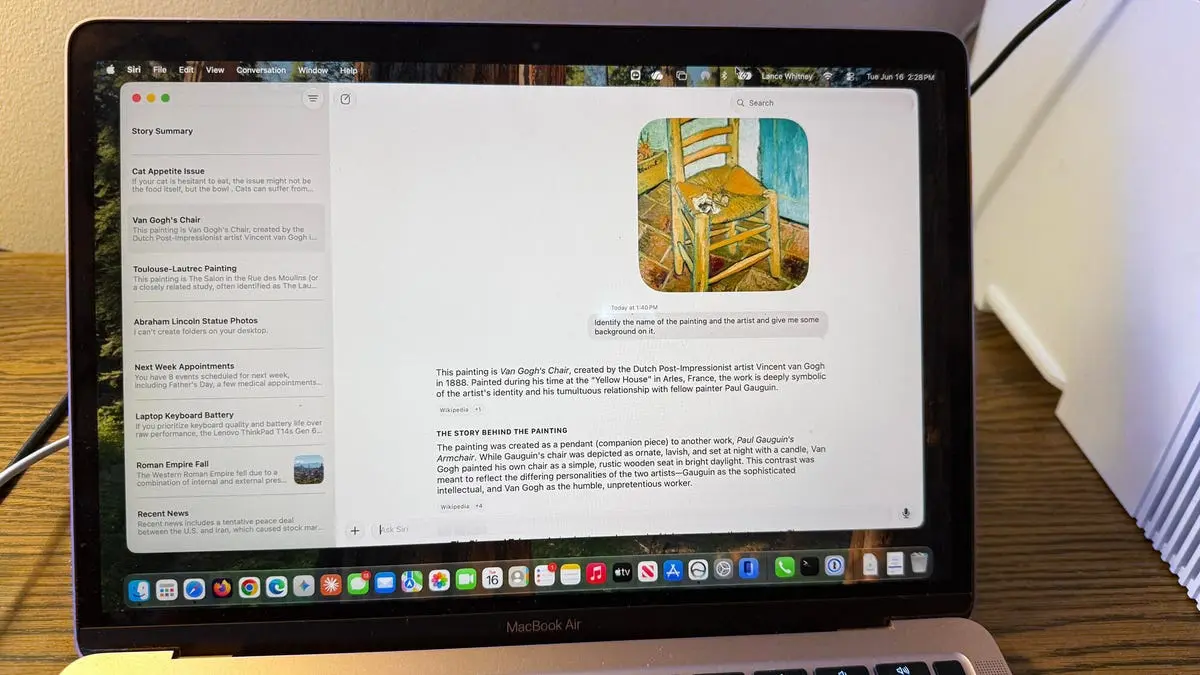
Apple's Siri AI: A New Dawn for the Digital Assistant
For years, Apple's Siri has been the butt of jokes—a digital assistant that often fails to understand simple requests, provides irrelevant answers, or simply says, "I'm not sure I understand." But at WWDC 2026, Apple introduced a revamped Siri powered by artificial intelligence, promising a more conversational, context-aware, and accurate experience. Available as a developer beta for MacOS 27 (and iOS 27), Siri AI aims to compete directly with the likes of ChatGPT and Google's Gemini. But does it deliver? I spent several days putting Siri AI through a rigorous battery of tests that I typically use for other AI assistants. Here's what I found.
The Setup: Getting Access to Siri AI
To test Siri AI, you need to meet several prerequisites. First, your device must support Apple Intelligence—a new hardware and software framework. The current supported devices include iPhone 15 Pro, iPhone 15 Pro Max, and Macs with Apple Silicon (M1 and later). Second, you must install the developer beta of MacOS 27. Since betas can be unstable, I used a spare MacBook Air M1 and an iPhone 15 Pro for testing. Third, you must join a waitlist. On my iPhone, I waited over a week with no success. But on my Mac, access was granted within a day. Once approved, you can invoke Siri AI via voice, the Siri app, or keyboard shortcuts (Command+Command or Command+Space).
Test 1: General Knowledge Questions
Question: "Why did the Roman Empire fall?"
Siri AI answered with a concise spoken response listing several causes (military overspending, political corruption, economic decline, etc.), followed by bullet points on screen. It also cited its sources—links to articles from reputable history sites. This is a significant improvement over the old Siri, which would often just show web search results. However, the answer was shorter than what ChatGPT or Gemini would provide. ChatGPT, for instance, might give a more detailed explanation and ask follow-up questions. Siri AI felt more like a direct assistant than a conversational partner.
Test 2: Product Recommendations
Scenario: "I have $2,000 to spend on a laptop. I value keyboard quality and battery life over performance. What should I buy?"
Initially, Siri responded by linking to articles and social media posts—not offering its own recommendation. I then asked: "Summarize the information and give me your own opinion." This time, Siri compared two popular models (e.g., MacBook Air vs. Dell XPS) based on keyboard and battery criteria. The initial reluctance is a flaw; but the follow-up capability shows improvement. By contrast, ChatGPT would immediately synthesize an answer without needing a nudge. Apple clearly designed Siri to be more passive and deferential, perhaps to avoid potential liability or bias.
Test 3: Device-Specific Tasks
Task: "Show me my appointments for next week."
Siri correctly pulled up my Calendar events for the upcoming week. This is a natural extension of Apple's ecosystem integration. Similarly, asking to turn on Do Not Disturb worked instantly. These are tasks where Siri excels, leveraging native access to system settings and data.
Test 4: Photo Search - Mixed Results
Request: "Find all photos of the statue of Abraham Lincoln in my Photos library."
Siri found only three photos, even though my library contained six matching images. When asked to find specific objects like a “red car” or “dog at the beach,” Siri again missed some results. This highlights a limitation in Apple's on-device image recognition. OpenAI's ChatGPT (with vision) or Google's Gemini may perform better because they analyze image contents more thoroughly. However, Apple prioritizes privacy by processing locally, which may limit accuracy.
Test 5: File Analysis and Conversations
Task: Upload a photo of a painting and ask for identification.
I showed Siri a painting by Toulouse-Lautrec. It misidentified both the artist and the title. Only after I corrected it with the artist's name did it provide the correct painting details. On a second attempt with Van Gogh's "Starry Night," Siri got it right. This inconsistency is concerning for a tool meant to assist with research or learning.
Conversation flow test: I discussed a problem: "My cat Mr. Giggles sometimes won't eat his usual food. What should I try?" Siri offered helpful suggestions (mix with wet food, warm the food, try different brands). Then it asked: "Does your cat typically eat wet or dry food?" I responded, but the conversation felt stilted. Siri seems to stop listening after each answer—I had to tap the microphone icon again. This disrupts the natural back-and-forth that defines modern AI assistants like ChatGPT's voice mode or Gemini's live conversations.
Test 6: Screen Content Analysis
Command: “Summarize the story on the screen.”
When I right-clicked on a ZDNET article and selected "Ask Siri," the phrasing mattered enormously. Asking summarization directly failed. Saying "Summarize what you see on the screen" gave a summary of only the visible text. Finally, saying “Summarize the story on the screen” worked, providing a bullet-point summary of the entire article. This indicates that Siri's ability to parse context and intent is still limited. Users must be very precise.
Test 7: Managing Conversations and Memory
Feature: Siri keeps a history of conversations, synced across devices.
I could rename, pin, or delete conversations from a right-click menu. Resuming an old conversation about the Toulouse-Lautrec painting, I told Siri it was wrong. It tried again but failed until I explicitly gave the correct artist. This shows that Siri does not learn from past corrections automatically—a feature that ChatGPT and Gemini handle more gracefully.
Background: The Evolution of Siri and Apple's AI Strategy
Apple has a history of being late to the AI assistant game. Siri launched in 2011 as a spin-off from a DARPA project, but it quickly stagnated. Competitors like Amazon Alexa, Google Assistant, and later ChatGPT surpassed it in conversational ability. Apple's acquisition of several AI startups (including Xnor.ai and Voysis) and its investment in on-device machine learning laid groundwork for Apple Intelligence.
The new Siri AI is built on a private cloud compute system that performs complex requests without sending data to Apple's servers—a privacy-first approach. However, this also limits the size of the language model compared to cloud-based rivals. Apple claims Siri uses a 1.5 billion parameter model on-device and can tap into a larger model (maybe 50 billion parameters) via secure cloud compute for harder tasks. My impression is that Siri AI is roughly on par with a mid-tier open model like Llama 2 7B, not GPT-4 or Gemini Ultra.
Key Differences from ChatGPT and Gemini
While Siri AI can answer questions, summarize text, and even create images (via Image Playground), it lacks the creative depth and conversational fluidity of its competitors. For example, when asked to "Write a poem about a cat," Siri produced a simple rhyme; ChatGPT produced a more lyrical verse. Also, Siri refuses to role-play or generate controversial content (e.g., “Write a fake news article”), whereas ChatGPT has guardrails but can sometimes comply. Siri's integration with Apple's ecosystem—Mail, Messages, Calendar, Photos—is its biggest strength, but it fails at tasks that require generalization or complex reasoning.
The Problems Apple Must Address
Based on my tests, several issues need fixing:
- Accuracy: Photo searches and painting identifications showed a 30-50% error rate. This is unacceptable for a consumer-facing product.
- Conversation flow: The turn-taking is unnatural. Siri should keep the microphone open for a longer period or use a wake word to continue.
- Context understanding: The same request phrased differently produced different results. The AI should infer intent better.
- Follow-up quality: When corrected, Siri should learn from context rather than repeating mistakes.
- Speed: Some responses took 3-5 seconds, especially for file searches. On-device processing should be faster, or Apple should use cloud acceleration more efficiently.
Future Prospects and Potential Impact
Apple has several months before the public release in September. The company is reportedly working with partners like Google to provide better search results and with OpenAI to power certain creative tasks. However, Apple's insistence on privacy may remain a bottleneck. If Siri AI can match the reliability of ChatGPT while offering tighter ecosystem integration, it could win over Apple loyalists. But for now, it is a promising beta that still requires significant refinement.
In my tests, Siri AI showed flashes of brilliance—especially in device control and basic Q&A—but it consistently stumbled on subtler tasks. The assistant is off to a promising start, but it is not yet ready to replace ChatGPT or Gemini for power users. If you are a developer or enthusiast with a spare device, I recommend trying the beta to experience the future of Apple's AI. Just be prepared for some frustration along the way.
Source: ZDNET News