

Google's Gemini Notebook is meant to be a flexible research assistant. It lets users upload or import source content and then ask questions, generate summaries, and create new learning materials. In the past, those sources could include websites, documents, images, audio files, and videos. Now, supported eBooks from Google Play Books can also be added to a notebook.
The new capability works with books purchased through the Google Play store. It doesn't work with every eBook a reader owns, because only certain titles, authors, and publishers are included. Still, the initial catalog is large. Google says more than 100,000 books are supported, including titles from Bloomsbury, De Gruyter Brill, Johns Hopkins University Press, Macmillan Publishers, O'Reilly Media, and Penguin Random House.
Google has also worked with more than 15 bestselling authors to create "featured notebooks." These appear on the Gemini Notebook home page and can be opened without any purchase. The notebooks are designed to enrich a chosen book with extra sources and context, giving readers a broader view of the author's work and the ideas inside it.
The Play Books integration is part of Google's broader "Expert Intelligence" initiative. According to Google, the goal is to help people better understand the books, authors, and subjects they care about. Books can now act as primary sources inside a notebook, alongside websites, PDFs, and other documents. The company says it plans to add more of its own products and later support third-party subscriptions and textbooks.
"We've built the ability to add select ebooks you've purchased from Google Play Books directly to a Gemini Notebook," Google said in a blog post. "This makes it simple for you to ask questions about the book and receive responses grounded directly in that book." The post also mentioned that users can generate infographics, audio overviews, quizzes, and more from the book's content.
One important detail: sources that require a purchased book do not transfer through notebook sharing. If someone shares a notebook that includes a paid Google Play Book, the recipient will not see the book's content. Instead, that person must buy their own copy of the supported title before they can view or work with it.
How to try the Play Books integration
You don't have to buy a book to test the feature. Gemini Notebook includes featured notebooks at the top of its main page. Select "View All" to see the full collection, then open one that seems interesting. These notebooks come with the author collaboration already included, so you can ask questions and explore the subject without adding any source yourself.
For a more personal test, you can buy a supported book and add it to a new notebook. Open your Gemini Notebook page, create a new notebook or open an existing one, and use the source panel to choose Google Play Books. Any compatible books you own should appear at the top of the screen; unsupported books appear farther down. Pick a book and add it as a source.
Once the book is present, Gemini builds a grounding index that can answer questions using information from that book. The resulting answers should stay anchored to the text rather than relying on general AI knowledge. From there, you can also generate different kinds of content from the same source, such as infographics, podcasts, or quizzes.
How to check whether a book is eligible
Because not every Google Play book is supported, it helps to check before making a purchase. There are several ways to see whether a title has Gemini Notebook support.
- Use the Expert Intelligence page. Scroll to the bottom of Google's Expert Intelligence page and look for the section titled "Get started with an Expert Intelligence-eligible book." The carousel there shows supported titles, and you can click one to buy it.
- Take advantage of the free book offer. On the same Expert Intelligence page, Google has a limited-time offer labeled "Get your first book on us." Select "Redeem offer," choose a free title in the Google Play store, and follow the steps to add it to your collection.
- Open a book's details page. In Google Play Books, select a title to view its details page. Click the question mark on the Tools icon. If the book is supported, Gemini Notebook will be listed there.
- Look through Gemini Notebook itself. Sign in to your Gemini Notebook page and create a new notebook or open an existing one. In the left sidebar, click the link to add a source. Select Play Books, then click the option to explore Google Play Books. Scroll to the bottom and choose the image that says you can find more books to add to Gemini Notebook. The resulting page will show compatible titles.
After you have bought an eligible book, add it as a source through the same Play Books connection. Gemini will place supported books at the top of the list. Pick the one you want to work with and click the button to add it. You can then ask questions, create reports, or combine the book with websites and other documents.
Three hands-on uses for the feature
I have tested this integration with different kinds of research projects. Here are three practical ways to make use of it.
1. Explore a classic novel
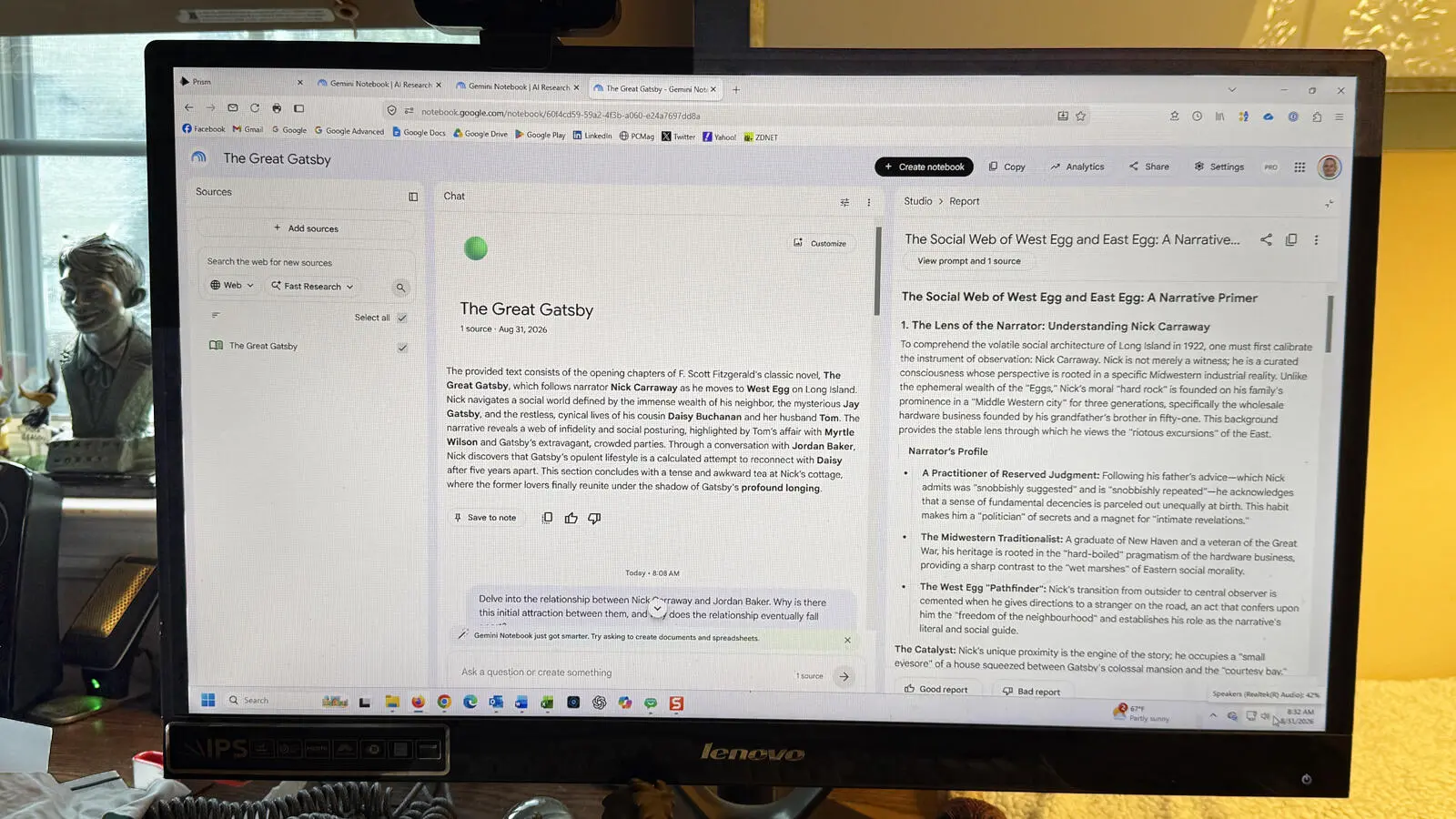
One of the first books I added was F. Scott Fitzgerald's The Great Gatsby. After adding it to a new notebook, Gemini generated a summary of the book and offered several sample questions. I asked the AI to delve into the relationship between Nick Carraway and Jordan Baker, looking at why the two characters are initially attracted to each other and why the relationship eventually falls apart. Gemini returned a thoughtful character analysis that showed a clear understanding of the novel's social dynamics.
From there, I asked Gemini to create a report based on its analysis. The tool gave me a choice of formats, including a document, study guide, blog post, landscape analysis, narrative primer, or thematic guide. I chose the narrative primer. Gemini produced a report that examined the motivations, social status, and outcomes of the major characters in the novel.
2. Analyze an author across multiple works
In a second project, I wanted to explore themes running through the novels of Charles Dickens. Using Gemini Notebook, I added seven Dickens books from Google Play Books, including Great Expectations, A Tale of Two Cities, Oliver Twist, The Pickwick Papers, and A Christmas Carol. The AI was able to analyze all of these sources together and identify common themes.
Gemini highlighted issues such as the cruelty and absurdity of incarceration and the legal system, the vulnerability and resilience of childhood and orphans, and institutional hypocrisy and perverted morality. I then asked for an audio overview, which functioned like a podcast. The two AI hosts discussed the shared ideas across the books and drew on material from every novel I had imported. The resulting conversation was a useful way to hear how Dickens returned to certain social concerns throughout his writing career.
3. Research a complex topic with mixed sources
For a broader research project, I explored how people work with and relate to AI. I started by adding several websites about human-AI interaction. Next, I uploaded Word documents containing articles I had written on the same subject. Finally, I imported a Google Play book I had purchased: Co-Intelligence: Living and Working with AI by Ethan Mollick.
After Gemini created a subject summary based on all of those sources, I asked it to explain the benefits and risks of forming emotional bonds with AI. The answer was clear and nuanced, describing both the promise and the potential dangers of emotional attachment to machines. Since Gemini's audio overviews are one of the most useful features, I then asked the tool to produce a podcast focused on the Mollick book. The AI hosts referenced specific passages and quotes from Co-Intelligence, which helped me see the book's arguments in a more conversational format.
These examples show that Gemini Notebook is no longer limited to articles and documents. By bringing purchased Google Play Books into the AI workspace, readers can study individual titles, compare works by the same author, or blend books with other research sources to build a richer project.
Source: ZDNET News