

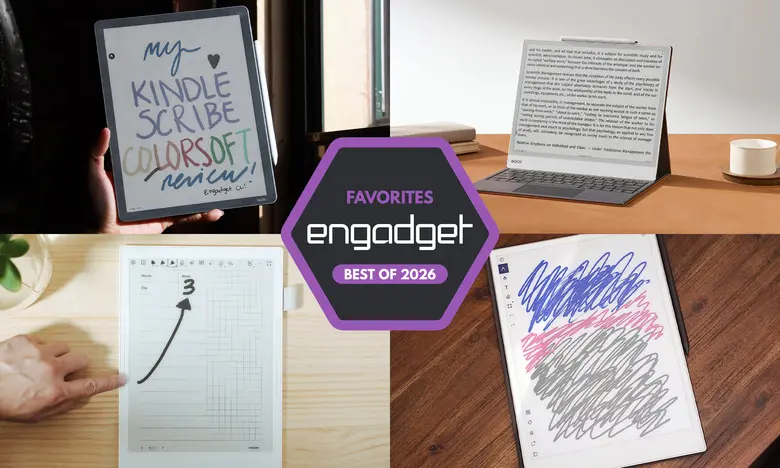
Best E Ink tablets for 2026
E Ink tablets have evolved significantly, offering the tactile satisfaction of paper notebooks with digital conveniences. Below are the top models for 2026, with key facts on their features, pros, and cons.
reMarkable 2: Best for most people
Key Facts:
- Screen: 10.3-inch monochrome E Ink
- Battery: Up to two weeks
- Connectivity: Wi-Fi
- Storage: 8GB
- Stylus: Sold separately (standard Marker or Marker Plus)
- File Support: PDF, EPUB
- Price: $399 (with standard Marker); $449 (with Marker Plus)
The reMarkable 2 provides the best balance of writing feel, build quality, and ease of use. Its low-latency pen input feels close to real paper, and the device integrates with cloud services like Google Drive and Dropbox. However, the stylus costs extra, and full cloud features require a $3/month subscription.
Pros: Excellent writing experience; great reading experience; easy file management. Cons: Marker costs extra; expensive; cloud storage subscription needed for unlimited sync.
reMarkable Paper Pro: Best premium option
Key Facts:
- Screen: 11.8-inch Canvas Color E Ink (20,000 colors)
- Battery: Up to two weeks
- Connectivity: Wi-Fi
- Storage: 64GB
- Stylus: Sold separately
- File Support: PDF, EPUB
- Price: $629 (with standard Marker); $579 (on sale)
The Paper Pro boasts a larger color display, faster processor (1.8GHz quad-core), and improved latency (12ms). It feels premium and zippy, but remains expensive. The color screen adds utility for highlighting and diagrams. Like the reMarkable 2, it uses a streamlined interface and the Connect subscription.
Pros: Color display; backlight for dark environments; improved performance. Cons: High price; subscription needed for full cloud access.
Amazon Kindle Scribe: Best e-reader E Ink tablet
Key Facts:
- Screen: 11-inch monochrome E Ink (300 ppi)
- Battery: Up to months
- Connectivity: Wi-Fi, Bluetooth
- Storage: Up to 64GB
- Stylus: Included with premium pen
- File Support: Kindle formats (AZW3, AZW, TXT, PDF, unprotected MOBI, PRC)
- Price: $430 (no front light); $500 (with front light); $630 (Colorsoft with color display)
The latest Kindle Scribe offers faster performance, improved stylus, and seamless integration with the Kindle ecosystem. It supports limited markup of Kindle books (underlines and highlights) and notebook creation. The AI Search feature is hit-or-miss but useful for synthesizing notes. The Kindle library is a major draw for existing Amazon users.
Pros: Fast performance; low-latency writing; included premium pen; huge ebook library. Cons: AI Search needs improvement; markup of Kindle books is inconsistent.
Supernote A6 X2 (Nomad): Best for writing and note-taking
Key Facts:
- Screen: 7.8-inch monochrome E Ink
- Battery: Weeks
- Connectivity: Wi-Fi, Bluetooth
- Storage: 32GB (expandable via microSD up to 2TB)
- Stylus: Sold separately
- File Support: PDF, EPUB, Word, TXT, PNG, JPG, CBZ, FB2, XPS
- Price: $329 (A6 X2); $505 (Manta A5 X2 with 10.7-inch screen); stylus from $89
The Supernote excels in note-taking with features like keyword search, handwriting conversion, and custom templates. The FeelWrite 2 screen protector provides a smooth writing feel. Both the Nomad and Manta are user-repairable with replaceable batteries. The device runs a customized Linux-based OS with an app store (Kindle app included). It lacks a backlight.
Pros: Excellent writing experience; extensive notebook customization; good handwriting recognition; expandable storage. Cons: Stylus costs extra; no backlight; learning curve.
Onyx Boox Note Air4 C: Another color-display option
Key Facts:
- Screen: 10.3-inch Kaleido 3 color E Ink
- Battery: Weeks
- Connectivity: Wi-Fi, Bluetooth
- Storage: 64GB
- Stylus: Included
- File Support: Wide range including PDF, EPUB, DOC, MOBI, and more
- Price: $529 (bundle with stylus and case)
The Note Air4 C runs Android 13 with access to the Google Play Store, making it the most versatile for third-party apps. It offers low-latency writing with color brushes, AI handwriting recognition, and note sharing via email or cloud. The display is good for reading and note-taking, but not ideal for video consumption.
Pros: Color E Ink; full Android ecosystem; stylus included; versatile file support. Cons: Not good for video; less user-friendly than competitors; expensive.
Onyx Boox Note Max: Big-screen option
Key Facts:
- Screen: 13.3-inch Carta 1300 monochrome E Ink (300 ppi)
- Battery: Weeks
- Connectivity: Wi-Fi, Bluetooth
- Storage: 128GB
- Stylus: Included
- File Support: Same as Note Air4 C
- Price: $689 (includes cover and stylus)
The Note Max is ideal for users who prefer A4-sized notebooks. Its large display is perfect for doodling, calendar memos, and multitasking. It runs Android 13 and supports the Google Play Store. However, it lacks a front light and is quite expensive.
Pros: Sharp large display; expansive screen real estate; Android app support; included accessories. Cons: No front light; complex interface; high price.
Honorable Mention: reMarkable Paper Pro Move
Key Facts:
- Screen: 7.3-inch Canvas Color E Ink
- Battery: Two weeks
- Storage: 64GB
- Stylus: Included
- Price: $449
A compact version of the Paper Pro, the Move offers the same color screen and software in a steno-pad-sized body. It lacks a keyboard folio but is highly portable.
Pros: Compact; excellent build; good battery. Cons: Expensive for size; no keyboard option.
Honorable Mention: Kobo Libra Colour
Key Facts:
- Screen: 7-inch Kaleido 3 color E Ink
- Battery: Up to 40 days
- Storage: 32GB
- Stylus: Sold separately ($70)
- Price: $229 (without stylus); $300 with stylus
The Libra Colour combines Kobo's ereader ecosystem with stylus support for margin notes and notebooks. Its color display adds engagement, and the device is snappy with a warm front light. It's a solid alternative to the Kindle Scribe for those who prefer Kobo's library.
Pros: Color display; good performance; margin writing in ebooks; Dropbox/Google Drive sync. Cons: Smaller screen; stylus costs extra.
Are E Ink tablets worth it?
E Ink tablets are ideal for those who prefer a paper-like reading and writing experience, want to reduce distractions, or need a dedicated device for note-taking. They are less suited for multimedia consumption or heavy app usage. The choice depends on your budget, screen size preferences, and ecosystem (Kindle vs. Kobo vs. open Android).
What to look for in an E Ink tablet
Writing and latency
Look for low-latency stylus input and a screen that refreshes smoothly. Many tablets offer pressure sensitivity and tilt support. Some include a stylus; others require a separate purchase.
Reading
Consider screen size, supported file formats, and integration with ebook stores. Larger screens (10+ inches) are better for writing but less portable. Kindle and Kobo devices seamlessly sync with their respective libraries.
Search functionality
Handwriting recognition and keyword search vary. Some devices allow searching through handwritten notes, while others focus on typed text. Evaluate how important organization and retrieval are for your use case.
Sharing and connectivity
Wi-Fi and cloud syncing are common. Check if the device supports mobile apps or direct export to services like Google Drive, Dropbox, or email. None offer native OneNote or Evernote integration.
Price
E Ink tablets typically range from $300 to $800. Larger screens and color displays increase cost. Accessories like styluses and cases can add $50–$200.
Source: Engadget News